ESP32 Troubleshooting
ESP32 relay module not working: complete wiring, power, GPIO, and code guide
If your ESP32 relay module is not clicking, clicks at the wrong time, buzzes, resets the board, or refuses to switch a load, do not start by replacing the relay. Most ESP32 relay failures come from five things: wrong relay power, missing common ground, active-low trigger confusion, boot-sensitive GPIO pins, or noise from the load.
Direct answer
An ESP32 relay module usually stops working because the relay coil is not getting proper 5V power, ESP32 GND is not shared with relay GND, the relay module is active-low, the signal is connected to a boot-sensitive GPIO, or the switched load is injecting noise back into the ESP32 supply.
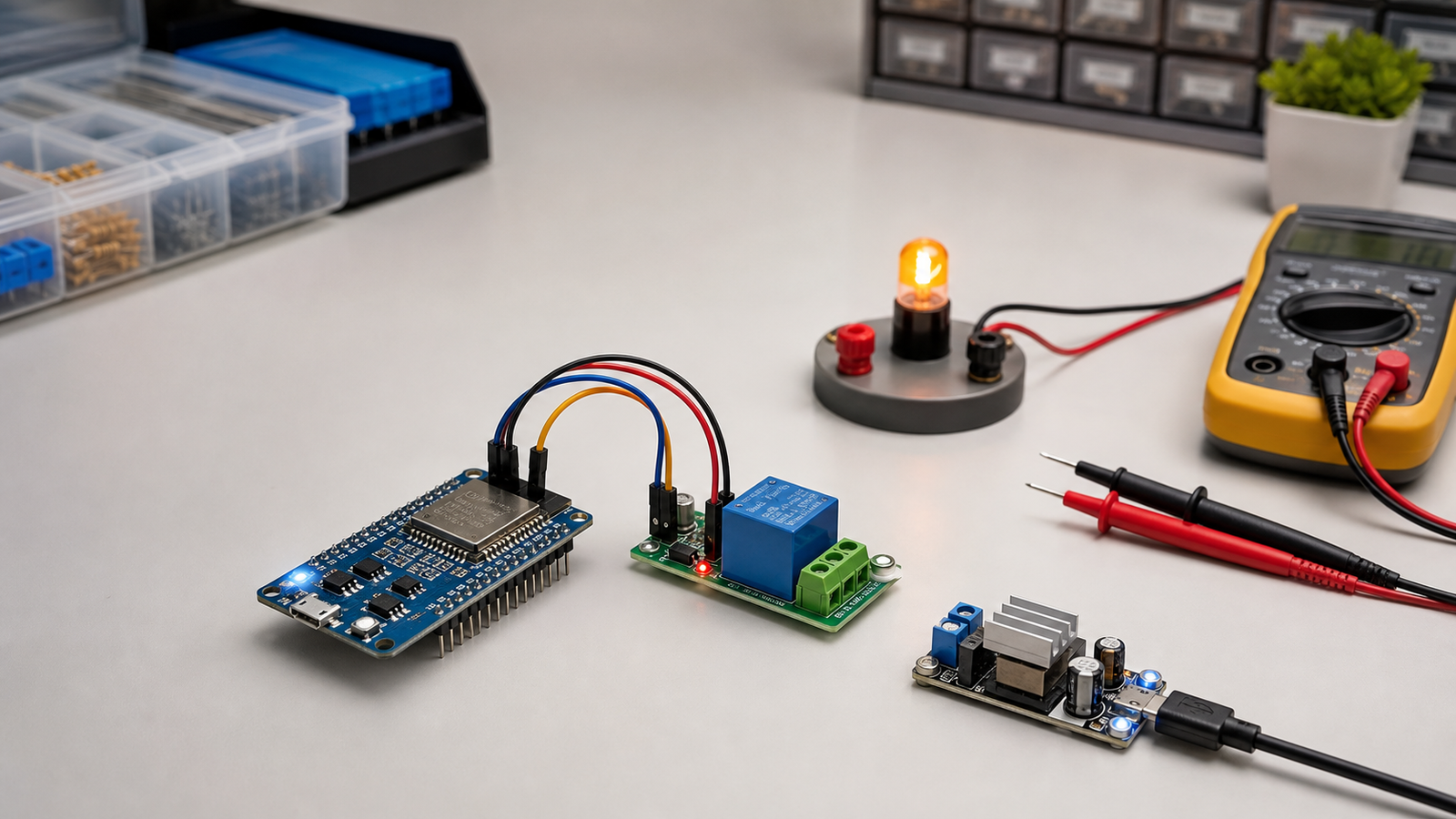
Fast Diagnosis
90-second fix checklist
- Power the relay module from a real 5V supply. Do not power the relay coil from the ESP32 3.3V pin.
- Connect ESP32 GND to relay module GND unless you are using true opto-isolation intentionally.
- Try reversing the logic. Many relay modules are active-low, so `LOW` turns the relay on.
- Move the signal wire to GPIO 16, 17, 18, 19, 21, 22, 23, 25, 26, 27, 32, or 33 for testing.
- Test the relay with an LED or multimeter first. Do not debug firmware while switching mains voltage.
Symptoms and likely causes
| Symptom | Most likely cause | First fix to try |
|---|---|---|
| Relay LED turns on, but relay does not click | Relay coil supply is missing or too weak | Use external 5V on JD-VCC/VCC depending on module |
| Relay is always on | Active-low trigger or boot-state GPIO | Invert HIGH/LOW logic and move to a safer GPIO |
| ESP32 resets when relay switches | Voltage dip, relay noise, poor grounding, or shared weak USB power | Separate relay power, add decoupling, improve ground wiring |
| Relay clicks but load does not turn on | Wrong COM/NO/NC wiring or load supply wiring | Check terminals with continuity mode on a multimeter |
| Relay buzzes or chatters | Insufficient coil voltage/current or noisy input signal | Use stable 5V, shorter wires, and a clean GPIO output |
| Works by USB, fails with adapter | Ground reference or supply quality changed | Measure 5V and 3.3V rails under load |
Correct ESP32 relay module wiring
A typical one-channel 5V relay module has `VCC`, `GND`, and `IN` pins on the control side. Some modules also expose `JD-VCC`, which separates relay coil power from logic power. The screw terminals are usually `COM`, `NO`, and `NC`.
Control side
- ESP32 GPIO to relay `IN`
- ESP32 GND to relay `GND`
- Relay `VCC` to 5V, if the module requires 5V logic/coil supply
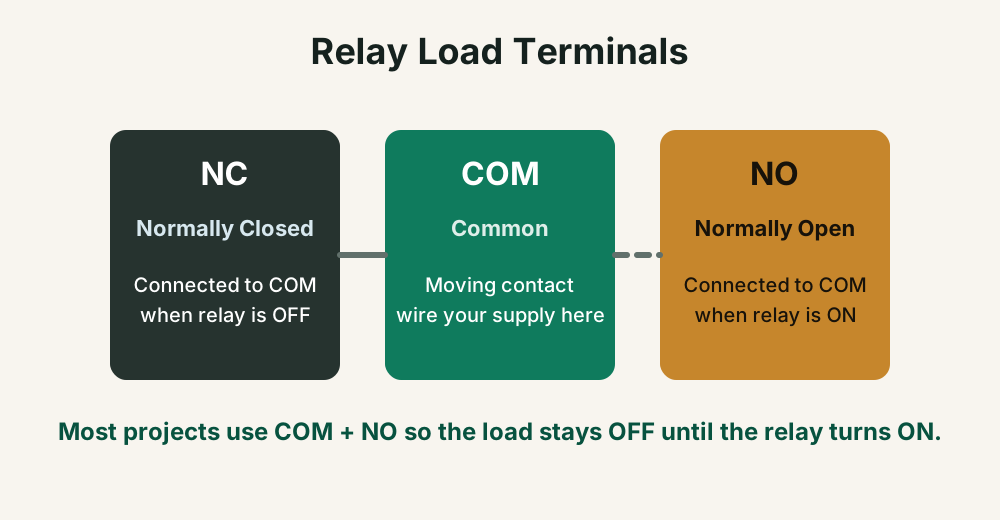
Load side
- `COM` is the moving contact
- `NO` means normally open, load is off until relay turns on
- `NC` means normally closed, load is on until relay turns on
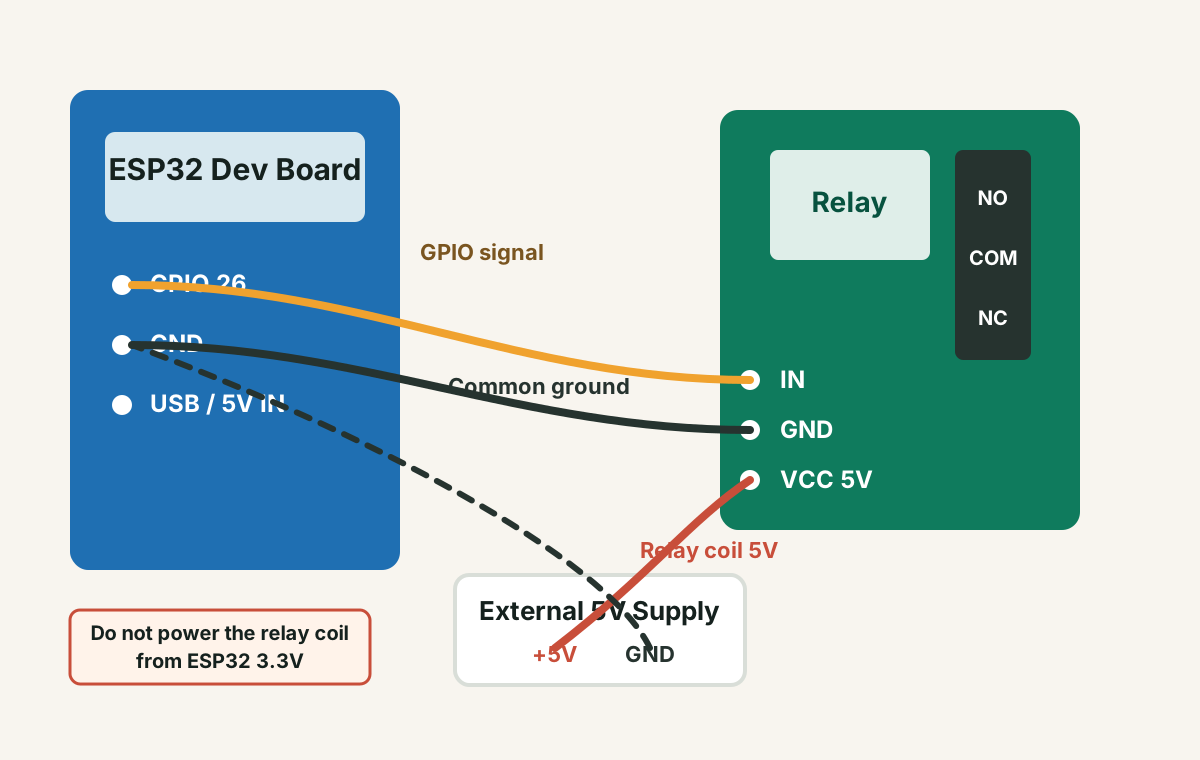
Do not place mains AC on a breadboard. If you are switching 230V AC loads in India, use a properly rated enclosure, fuse, strain relief, wire gauge, terminal blocks, and isolation. When in doubt, test only the relay contact continuity and get qualified help for mains wiring.
Power: the most common ESP32 relay problem
The ESP32 is a 3.3V microcontroller. Many relay modules are 5V modules. The signal pin may respond to 3.3V, but the relay coil still needs enough 5V current. If you try to power the relay coil from the ESP32 board, USB cable, or weak regulator, the relay may not click or the ESP32 may reset.
Use this power plan for testing
- Power ESP32 through USB or a reliable 5V input.
- Power the relay coil/module from a separate 5V adapter if the relay load is noisy or the relay board has multiple channels.
- Connect grounds together: ESP32 GND, relay GND, and 5V supply GND.
- Add a 100uF to 470uF electrolytic capacitor near the relay module and a 0.1uF ceramic capacitor near logic power if the setup is noisy.
If it drops hard, the relay supply is too weak or the wiring has too much resistance.
If the 3.3V rail dips, the ESP32 can reboot even if your code is correct.
Charge-only or thin USB cables cause frustrating intermittent failures.
GPIO pins: avoid boot trouble
Some ESP32 pins affect boot mode or have special behavior at startup. A relay connected to those pins can turn on during boot, prevent the ESP32 from starting, or behave backwards for a moment.
| Better pins for relay testing | Pins to avoid for first tests |
|---|---|
| GPIO 16, 17, 18, 19, 21, 22, 23, 25, 26, 27, 32, 33 | GPIO 0, 2, 4, 5, 12, 15, 34, 35, 36, 39 |
GPIO 34 to 39 are input-only on many ESP32 boards, so they cannot drive a relay signal. GPIO 0, 2, 12, and 15 can affect boot strapping. GPIO 5 is often usable, but can be tied to SPI peripherals on some setups, so avoid it while debugging.
Minimal ESP32 relay test code
Before adding Wi-Fi, Blynk, MQTT, Firebase, sensors, or web servers, test the relay with a tiny sketch. This separates wiring and power problems from application code problems.
const int relayPin = 26;

// Many relay modules are active-low:
// LOW  = relay ON
// HIGH = relay OFF
const int relayOn = LOW;
const int relayOff = HIGH;

void setup() {
  pinMode(relayPin, OUTPUT);
  digitalWrite(relayPin, relayOff);
  delay(1000);
}

void loop() {
  digitalWrite(relayPin, relayOn);
  delay(2000);
  digitalWrite(relayPin, relayOff);
  delay(2000);
}
If this code works but your full project fails
- Your full code may be blocking, crashing, or resetting the ESP32.
- Wi-Fi startup may be pulling extra current from a weak supply.
- A sensor library may be using the same GPIO or bus incorrectly.
- Your relay may be switching a noisy load that the simple test did not include.
Switching real loads: motors, pumps, bulbs, and AC appliances
A relay that works with no load can fail when connected to a pump, solenoid, motor, bulb, or AC appliance. Real loads introduce inrush current, inductive kick, contact arcing, and electrical noise.
For DC motors, pumps, and solenoids
- Use flyback protection across the load when appropriate.
- Keep motor power wiring away from ESP32 signal wiring.
- Use separate supplies if the motor causes resets.
For AC loads
- Use relay modules rated for the load voltage and current.
- Add proper fuse, enclosure, terminals, insulation, and strain relief.
- Consider SSRs or contactors for frequent switching or large loads.
If the project is meant to run unattended, design for failure: default-off relay state, watchdog recovery, fuse protection, surge protection, clear enclosure wiring, and manual override where needed.
Active-low vs active-high relay modules
A common reason people think the relay is broken is that the module works backwards. Many low-cost relay modules are active-low. That means the relay turns on when the input pin is pulled low, and turns off when the input pin is high.
Quick test: upload the minimal code above, then swap `relayOn` and `relayOff`. If behavior flips and becomes correct, your wiring is probably fine and the issue was logic polarity.
When you should not use a relay
Relays are simple and useful, but they are not always the best choice. For fast switching, silent operation, PWM control, or high cycle counts, a MOSFET, solid-state relay, motor driver, or contactor may be better.
- Use a MOSFET for DC LED strips, DC motors, heaters, and solenoids when on/off electronic switching is enough.
- Use a motor driver for speed and direction control.
- Use an SSR for some AC switching cases, but check leakage current and heat dissipation.
- Use a contactor for large AC loads beyond small relay-module territory.
FAQ
Can ESP32 drive a 5V relay module directly?
The ESP32 can often drive the input signal of a relay module, but it should not power the relay coil from its 3.3V pin. Use a proper 5V supply for the relay module and check whether the module accepts 3.3V logic on the input.
Do I need common ground between ESP32 and relay?
Usually yes. If the relay input signal is referenced to the ESP32 GPIO, both sides need a shared ground. Some opto-isolated relay boards can be wired differently, but many inexpensive boards are not truly isolated in the way beginners expect.
Why does the relay turn on when ESP32 boots?
The GPIO may change state during boot, or the relay module may be active-low. Move the relay to a safer GPIO and design the circuit so the default state is safe when the ESP32 resets or starts up.
Why does my ESP32 reset when the relay switches?
The most common causes are weak power, relay coil current, load noise, poor grounding, or voltage dips caused by motors, pumps, or solenoids. Separate power, add decoupling, shorten wires, and test without the load first.
Still stuck after the checklist?
Get the free Electronics Project Rescue Pack. It includes power, wiring, sensor, module, and breadboard-to-PCB checklists for ESP32 and Arduino projects.
Get the free rescue pack