Display Debugging
ESP32 OLED not displaying: complete I2C, address, and library fix guide
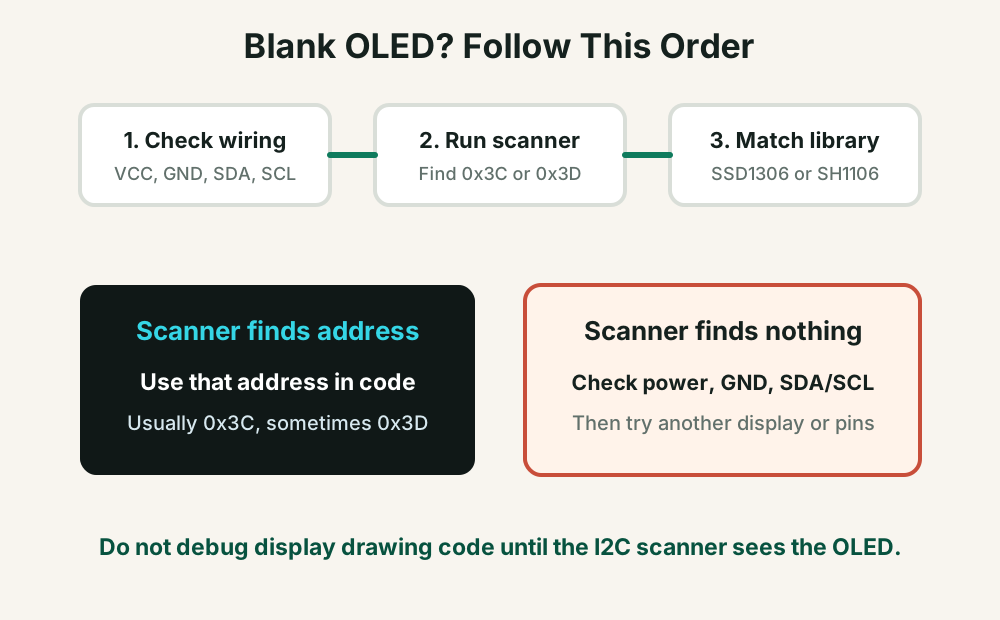
A blank OLED display usually means the ESP32 cannot communicate with the display, or the code is talking to the wrong address, wrong controller, or wrong screen size. Start with I2C detection before debugging fonts, graphics, or application code.
Direct answer
An ESP32 OLED display is usually blank because VCC/GND/SDA/SCL wiring is wrong, the code uses the wrong I2C address, the display is SH1106 instead of SSD1306, or the screen size is mismatched. Run an I2C scanner first; if the scanner cannot find 0x3C or 0x3D, fix wiring before changing display code.
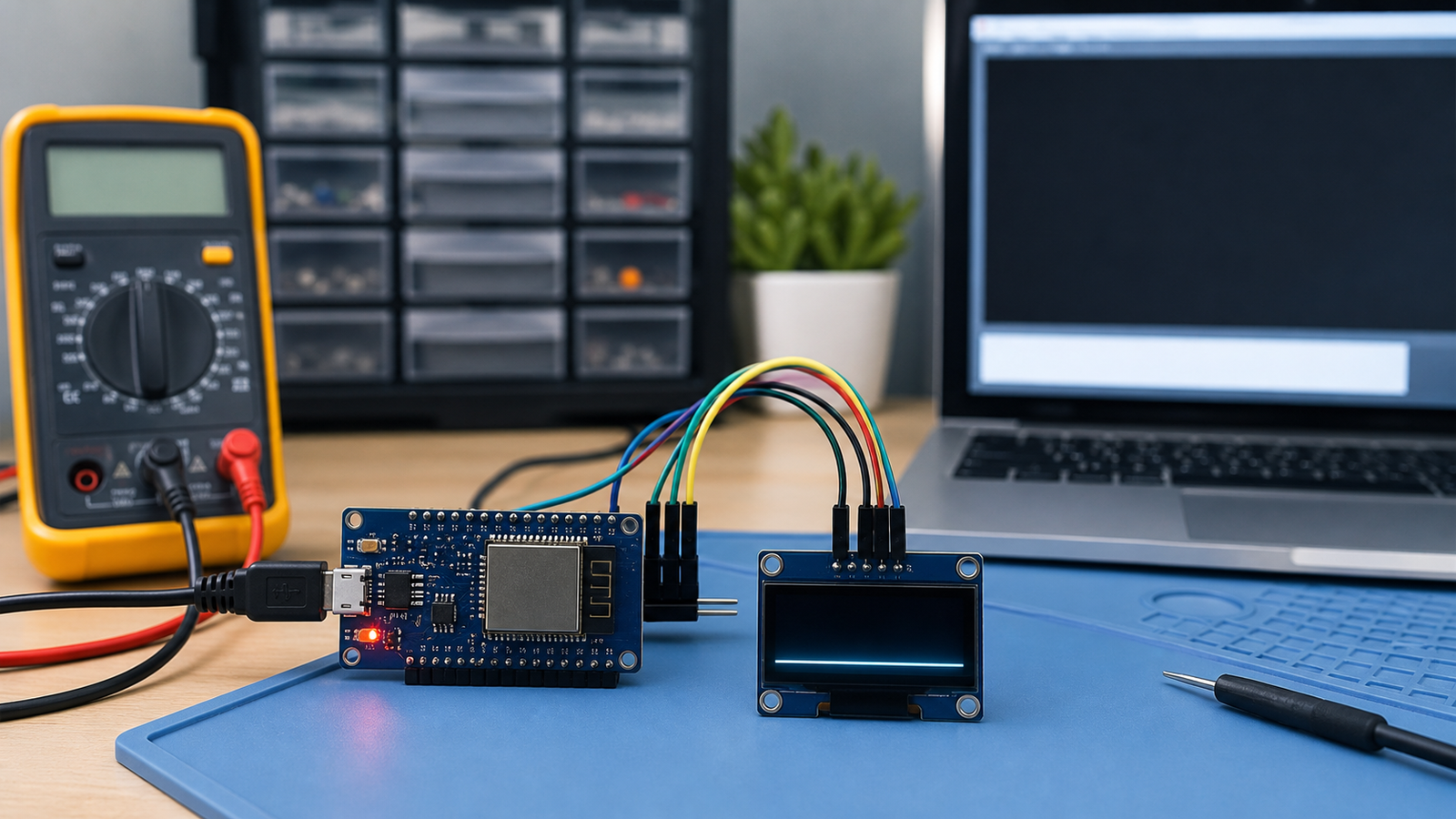
Fast Diagnosis
90-second OLED fix checklist
- Connect OLED VCC to the correct voltage for your module, often 3.3V or 5V depending on breakout.
- Connect OLED GND to ESP32 GND.
- Use SDA = GPIO 21 and SCL = GPIO 22 for a simple first test, or define custom pins explicitly.
- Run an I2C scanner and confirm the display appears at 0x3C or 0x3D.
- Confirm the controller: SSD1306 and SH1106 displays often need different libraries.
- Match the screen size in code, usually 128x64 or 128x32.
Symptoms and likely causes
| Symptom | Most likely cause | First fix to try |
|---|---|---|
| OLED stays completely blank | No power, wrong wiring, wrong I2C pins, or wrong address | Run I2C scanner and verify VCC, GND, SDA, SCL |
| I2C scanner finds nothing | Wiring error, bad solder joint, no pullups, wrong power, damaged display | Try default GPIO 21/22, shorter wires, and inspect header soldering |
| Scanner finds 0x3C but display is blank | Wrong library, wrong display controller, wrong screen size, or missing display update call | Confirm SSD1306 vs SH1106 and 128x64 vs 128x32 |
| Only random pixels or distorted output | Wrong controller, screen size, or buffer configuration | Try SH1106 library if SSD1306 code behaves strangely |
| Works alone but fails with sensors | I2C address conflict, bus wiring length, weak pullups, or code blocking | Scan bus with all modules connected and test one module at a time |
Correct ESP32 OLED I2C wiring
Most small OLED modules used with ESP32 have four pins: `VCC`, `GND`, `SDA`, and `SCL`. The exact order can differ by module, so read the silkscreen before plugging wires.
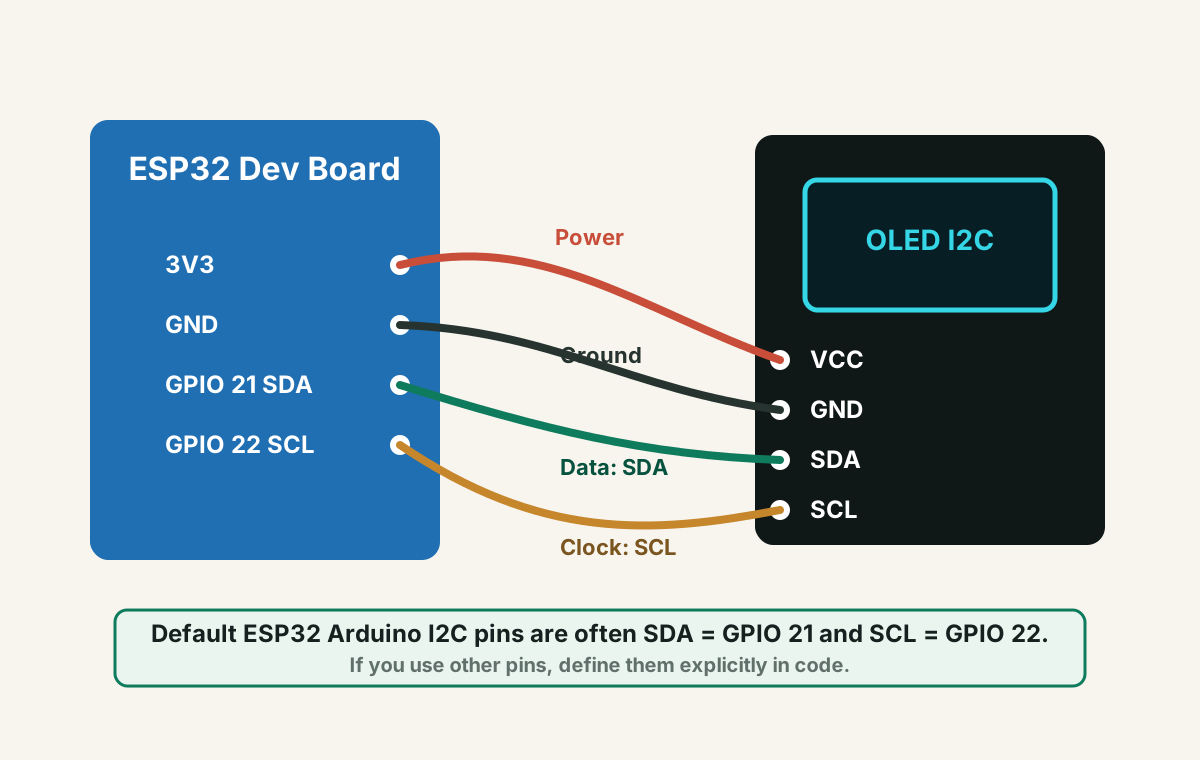
Arduino Uno examples use A4/A5 for I2C. Do not copy those wires directly to ESP32. ESP32 boards use GPIO pins, and examples often default to GPIO 21 and GPIO 22.
Run an I2C scanner before display code
The I2C scanner is the fastest way to separate wiring problems from library problems. If the scanner cannot find the display, your display drawing code will not work.
#include <Wire.h>

void setup() {
  Serial.begin(115200);
  Wire.begin(21, 22); // SDA, SCL
  Serial.println("Scanning I2C...");
}

void loop() {
  byte error, address;
  int devices = 0;

  for (address = 1; address < 127; address++) {
    Wire.beginTransmission(address);
    error = Wire.endTransmission();

    if (error == 0) {
      Serial.print("I2C device found at 0x");
      if (address < 16) Serial.print("0");
      Serial.println(address, HEX);
      devices++;
    }
  }

  if (devices == 0) Serial.println("No I2C devices found");
  delay(3000);
}
SSD1306 vs SH1106: the library matters
Many small OLED modules are advertised generically as “I2C OLED,†but they may use different controllers. SSD1306 and SH1106 displays can look similar, but code written for one may produce a blank or distorted display on the other.
Use the scanner result. Do not assume every OLED is 0x3C.
Check seller listing, display marking, or try the matching library.
Wrong dimensions can make output invisible, cropped, or corrupted.
Minimal SSD1306 test code
Use this only after the I2C scanner finds the OLED. If your scanner finds `0x3D`, change the address in the display constructor or initialization according to your library.
#include <Wire.h>
#include <Adafruit_GFX.h>
#include <Adafruit_SSD1306.h>

#define SCREEN_WIDTH 128
#define SCREEN_HEIGHT 64
#define OLED_RESET -1

Adafruit_SSD1306 display(SCREEN_WIDTH, SCREEN_HEIGHT, &Wire, OLED_RESET);

void setup() {
  Wire.begin(21, 22); // SDA, SCL

  if (!display.begin(SSD1306_SWITCHCAPVCC, 0x3C)) {
    while (true) {
      delay(100);
    }
  }

  display.clearDisplay();
  display.setTextSize(1);
  display.setTextColor(SSD1306_WHITE);
  display.setCursor(0, 0);
  display.println("ESP32 OLED OK");
  display.display();
}

void loop() {}Re-check the scanner address, display controller, screen size, and whether your OLED module needs a different library such as an SH1106-compatible library.
Hardware checks when the scanner finds nothing
- Inspect the OLED header solder joints. Unsoldered or cracked joints are common.
- Try shorter jumper wires and avoid loose breadboard connections.
- Check whether the OLED breakout already has I2C pullup resistors.
- Try powering from 3.3V first if the module supports it, especially with ESP32 logic.
- Test the OLED with another microcontroller or test another OLED with the same ESP32.
- Make sure you are using an I2C OLED, not an SPI OLED with different pins.
When OLED works alone but fails inside your project
Once the display works by itself, failures inside a larger project usually come from I2C bus conflicts, blocking code, memory pressure, or pin reuse.
- Scan the I2C bus with every module connected and check for address conflicts.
- Make sure another library is not reinitializing `Wire` with different pins.
- Watch memory usage if you use large display buffers, Wi-Fi, JSON, and web servers together.
- Update the display at a reasonable rate instead of redrawing constantly inside heavy loops.
FAQ
Why is my ESP32 OLED display blank?
The most common causes are wrong SDA/SCL wiring, missing ground, wrong I2C address, wrong display controller library, wrong screen size, or poor soldering on the OLED header.
What is the default I2C address for an OLED display?
Many OLED modules use 0x3C, but some use 0x3D. Run an I2C scanner instead of guessing.
What are the default ESP32 I2C pins?
In many ESP32 Arduino examples, SDA is GPIO 21 and SCL is GPIO 22. You can use other pins if you define them explicitly with `Wire.begin(SDA, SCL)`.
Can I use a 5V OLED with ESP32?
Many OLED breakout boards work with 3.3V or 5V power, but the I2C logic level and module design matter. Check the module specification and prefer 3.3V-compatible wiring for ESP32 projects.
Still seeing a blank display?
Get the free Electronics Project Rescue Pack. It includes module debugging, power, wiring, sensor, and breadboard-to-PCB checklists for ESP32 and Arduino projects.
Get the free rescue pack