PCB design tutorial for beginners
10 common PCB design mistakes beginners make, and how to avoid them before fabrication.
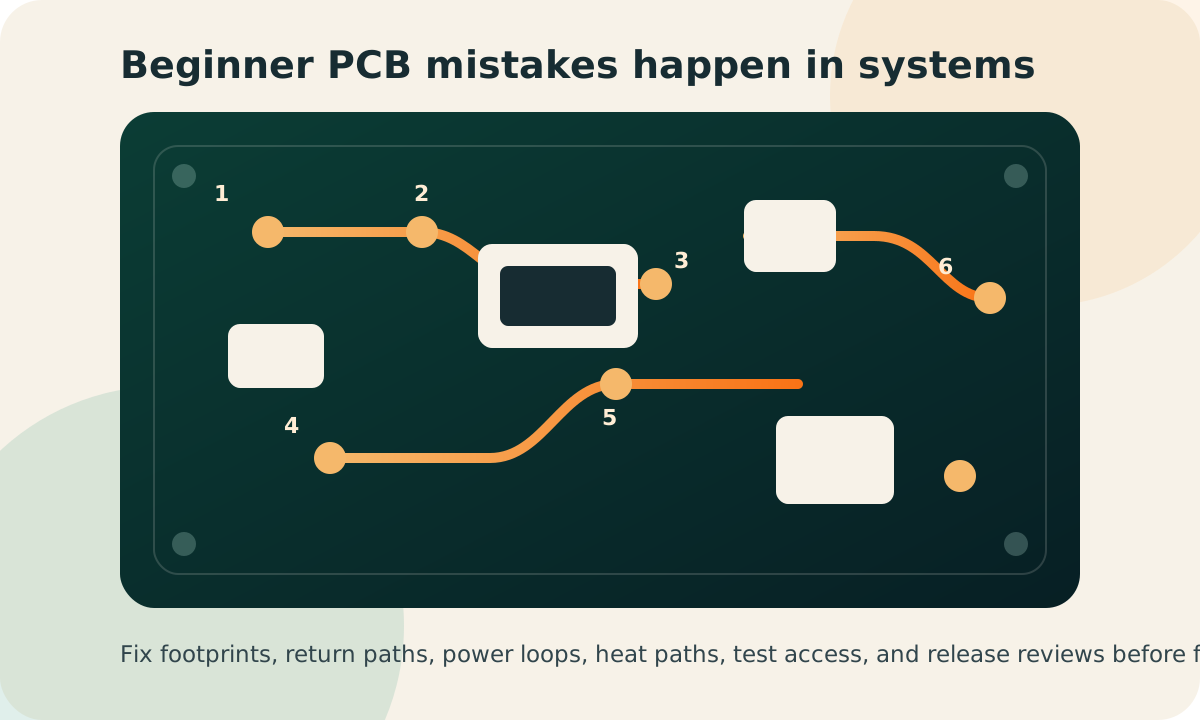
Most beginner PCB failures are not caused by one mysterious mistake. They usually come from a small chain of layout decisions: a return path gets broken, a footprint is trusted without checking, a capacitor is placed too far away, or a DRC warning is ignored because the board "looks fine."
Quick answer: what are the most common beginner PCB mistakes?
The most common beginner PCB design mistakes are poor grounding, wrong footprints, missing decoupling capacitors, random component placement, undersized traces, no thermal relief, weak thermal management, missing test points, long noisy signal routes, and skipping DRC or peer review.
The mistake-to-fix map
| Mistake | What usually goes wrong | Professional habit |
|---|---|---|
| Poor grounding | Noise, resets, unstable ADC readings | Use continuous return paths and a solid ground plane |
| Wrong footprint | Part cannot be soldered or assembled | Check every footprint against the datasheet and actual part |
| Missing decoupling | Voltage dips when ICs switch | Place local capacitors close to power pins |
| Undersized traces | Hot copper, voltage drop, burned boards | Calculate trace width from current and temperature rise |
| No test points | Debugging becomes guesswork | Add accessible points for rails, buses, reset, and programming |
1. Poor grounding and unclear return paths
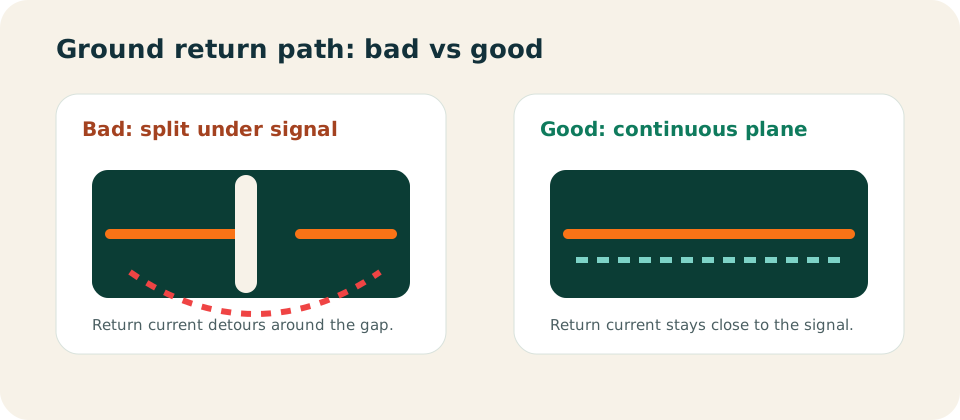
A trace does not work alone. Every signal current needs a return current, and that return current wants to travel close to the signal path. Beginners often pour ground copper and assume the board is grounded, but then they cut that copper with slots, traces, connectors, or random routing.
The symptom is usually messy: noisy sensor readings, random resets, unstable communication, EMI problems, or a board that works on USB but fails near motors and relays.
How to avoid it
- Use a continuous ground plane when the board stack-up allows it.
- Do not route high-speed or noisy traces across gaps in the ground plane.
- Keep switching regulator, motor, relay, and LED current loops compact.
- Separate noisy power routing from sensitive analog inputs, but avoid creating orphaned ground islands.
2. Trusting component footprints without checking them
A wrong footprint is one of the most expensive beginner mistakes because the schematic can be perfect and the board can still be unusable. Connector pitch, pin numbering, pad size, package variant, polarized part orientation, and courtyard clearance all matter.
Third-party libraries are helpful, but they are not a substitute for verification. Even a small landing pattern error can create tombstoning, weak solder joints, or a part that physically does not fit.
How to avoid it
- Open the manufacturer datasheet and compare pin count, pitch, pad size, and package dimensions.
- Print the PCB at 1:1 scale and place real connectors or modules on the paper before ordering.
- Check diode, LED, capacitor, IC, and connector pin-1 markings in both schematic and layout.
- For modules, verify the module outline, antenna keepout, mounting holes, and underside components.
3. Missing or misplaced decoupling capacitors
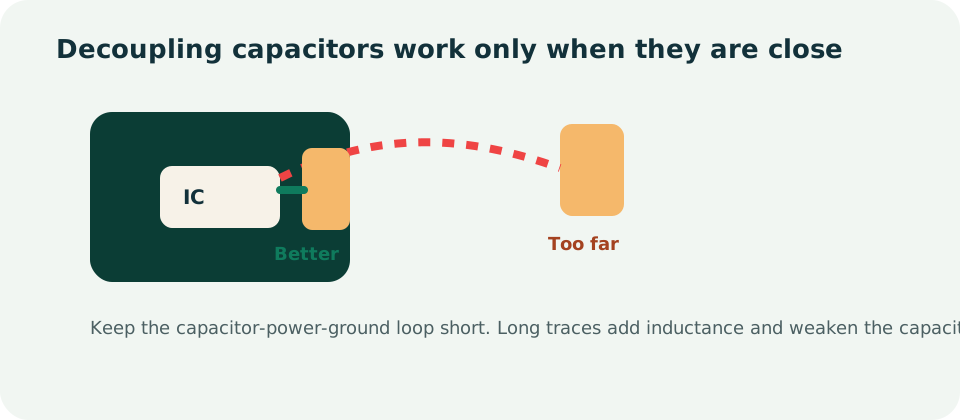
Digital ICs, sensors, radios, and microcontrollers draw short bursts of current when they switch. A decoupling capacitor acts like a tiny local energy tank, supplying that burst before the main power rail can sag.
The common beginner mistake is placing the capacitor far from the power pin, after a long trace, or on the opposite side of the board without a tight via path. At that point the trace inductance can cancel much of the benefit.
How to avoid it
- Place decoupling capacitors close to IC power pins, with a short path to ground.
- Use one local capacitor per important power pin or power domain unless the datasheet says otherwise.
- Follow the IC datasheet for bulk capacitor values, regulator output capacitors, and stability requirements.
- Keep the power-pin-to-capacitor-to-ground loop as small as possible.
4. Poor component placement before routing
Routing quality starts before the first trace is drawn. If components are placed randomly, the board will force long routes, crossed signals, awkward power paths, and noisy coupling between unrelated circuits.
Good placement follows the actual behavior of the circuit. Power enters, protection and regulation happen nearby, signals move through functional blocks, connectors face the enclosure, and hot or noisy parts get breathing room.
How to avoid it
- Place connectors, mounting holes, buttons, LEDs, displays, and enclosure-critical parts first.
- Group components by function: input power, regulation, MCU, sensors, drivers, communication, and output loads.
- Keep sensitive analog circuitry away from switching regulators, high-current traces, antennas, motors, and relays.
- Rotate parts to reduce crossed airwires before routing begins.
5. Undersized copper traces for high current
A narrow signal trace might be fine for a logic input, but it is not automatically safe for motors, heaters, LED strips, relays, GSM modules, battery charging, or high-current regulators. If copper is too narrow, the board can heat up, drop voltage, or fail under load.
Trace width depends on current, copper thickness, allowed temperature rise, layer position, and available copper area. A trace on an internal layer usually runs hotter than an external trace because it cannot dissipate heat as easily.
How to avoid it
- Use a trace-width calculator before routing power paths.
- Use copper pours or wide polygons for high-current rails when possible.
- Check voltage drop, not just heating, especially on low-voltage circuits.
- Consider 2 oz copper only when the board area, cost, and assembly process support it.
6. Skipping thermal relief on pads
Large copper pours are useful for heat spreading and low impedance, but they can make soldering difficult. If a through-hole pad connects directly to a large plane, the plane pulls heat away from the pad during soldering. The result can be cold joints, uneven wetting, or hand soldering that feels impossible.
How to avoid it
- Use thermal relief spokes for pads connected to large copper pours unless there is a clear high-current reason not to.
- Review manufacturer capabilities for annular ring, spoke width, and soldering process.
- For high-current terminals, balance solderability with current capacity instead of blindly using solid connections everywhere.
7. Ignoring thermal management until the board overheats
Heat is not only a power electronics problem. Regulators, MOSFETs, LEDs, motor drivers, battery chargers, and RF modules can all create local hotspots. If heat has no easy path out, the component may derate, shut down, drift, or fail early.
How to avoid it
- Read the package thermal information in the datasheet before choosing the part.
- Use copper area, thermal vias, and planes to spread heat away from hot components.
- Do not crowd multiple hot parts into the same corner unless airflow and copper area are designed for it.
- Keep heat-sensitive analog parts away from regulators, MOSFETs, and power resistors.
8. Forgetting test points
A board without test points turns bring-up into a tiny metal treasure hunt. You do not want your first debug session to depend on balancing a probe on a 1 mm via while the board resets.
Test points are cheap insurance. They help with manual debugging, automated test fixtures, production inspection, and future failure analysis.
How to avoid it
- Add test points for input voltage, regulator outputs, ground, reset, boot pins, programming pins, and key communication buses.
- Keep enough spacing around test points for probes or pogo pins.
- Label important rails and signals on silkscreen when space allows.
- Make at least one ground test point easy to clip or probe.
9. Routing long signal traces without thinking about noise
Long traces can behave like antennas, delay lines, and coupling paths. This is especially important for clocks, USB, RF, crystal traces, high-speed digital signals, switching nodes, and sensitive analog inputs.
How to avoid it
- Keep high-speed and noise-sensitive traces short and direct.
- Route important signals over a continuous reference plane.
- Avoid unnecessary stubs on high-speed lines.
- Keep switching regulator nodes compact and away from sensors, ADC inputs, and antennas.
- Follow impedance and antenna layout guidance for RF modules instead of improvising the antenna area.
10. Skipping DRC, Gerber review, and a second set of eyes
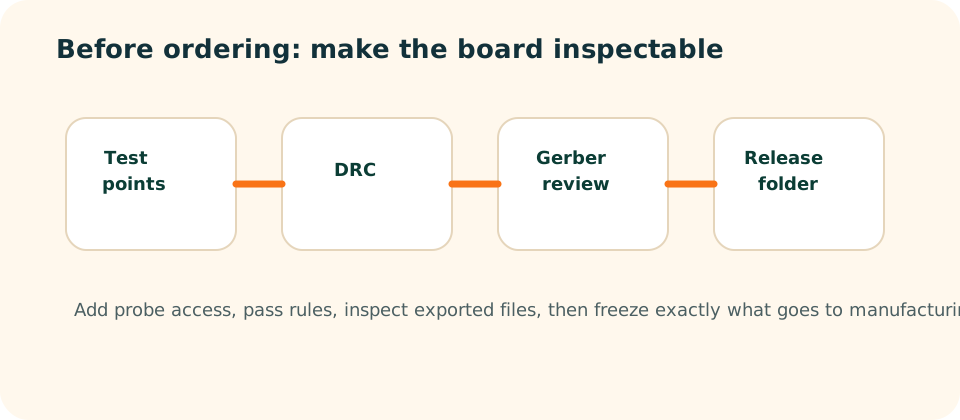
Design Rule Check is not a formality. It is the minimum automated review before you spend money on fabrication. Beginners often run DRC once, see a wall of warnings, and mentally file it under "probably fine." That is how clearance violations, unconnected nets, missing solder mask, and broken outlines slip through.
Even after DRC passes, inspect the generated manufacturing files. The Gerber viewer is where you catch missing drill files, wrong board outline, hidden silkscreen, incorrect solder paste, and layer export mistakes.
How to avoid it
- Set design rules from your PCB manufacturer before routing.
- Run ERC and DRC, then resolve or consciously document every remaining warning.
- Open the exported Gerbers and inspect copper, mask, paste, silkscreen, outline, and drill layers.
- Ask someone else to review footprints, connectors, polarity, and power paths before ordering.
Pre-fabrication checklist for beginners
- Every new footprint has been checked against the official datasheet.
- Power traces and copper pours are sized for current and voltage drop.
- Decoupling capacitors are close to IC power pins.
- Signals have clear return paths and do not cross ground-plane gaps.
- Hot components have copper area, vias, or airflow planned.
- Connectors show pin 1, polarity, cable direction, and external voltage labels.
- Test points exist for power rails, programming, reset, and critical buses.
- DRC and ERC have been run with manufacturer rules.
- Gerbers, drills, BOM, pick-and-place, and assembly notes are frozen into one release package.