Keep PCB files, Gerber exports, drill files, and release notes attached to the same board revision.
PCBVault Software for Windows
Stop shipping PCB projects from messy folders.
PCBVault is an offline-first desktop vault for PCB designers and hardware teams who need the right Gerbers, BOMs, schematics, notes, and manufacturing files tied to the right revision.
Free for 3 projects
Offline-first file storage
Made for PCB release handoff
🔒 SmartScreen Note: Our early beta installer is not code-signed yet. If Windows shows a warning, click "More Info" → "Run Anyway". A signed installer certificate is in progress.
🔌
100% Offline-First
No login, cloud accounts, or active internet required to create project vaults.
💾
Local File Integrity
Your schematics, boards, and BOMs stay on your hard drive. Zero external uploads.
🛡️
No Forced Cloud
Zero subscription lock-in, zero cloud dependency, and zero risk of data leaks.
The expensive mistake
One wrong zip file can waste a prototype batch.
The design may be correct, but the handoff can still fail. Old Gerbers get reused. BOM alternates are missed. Drill files sit in a different folder. A client receives a package with no context. PCBVault is built to make the release package obvious before money goes to fabrication or assembly.
Store purchasing BOMs, assembly BOMs, alternates, datasheets, and part notes in one project vault.
Package the project around a clear release instead of sending scattered attachments and folder links.
Watch it in action
See how PCBVault organizes a release in 2 minutes
Watch how we open a project, compare BOM versions, verify Gerbers, and lock the release package locally.
▶
Play 2-Minute Demo Tour
Click to run interactive workflow simulation.
Product Tour
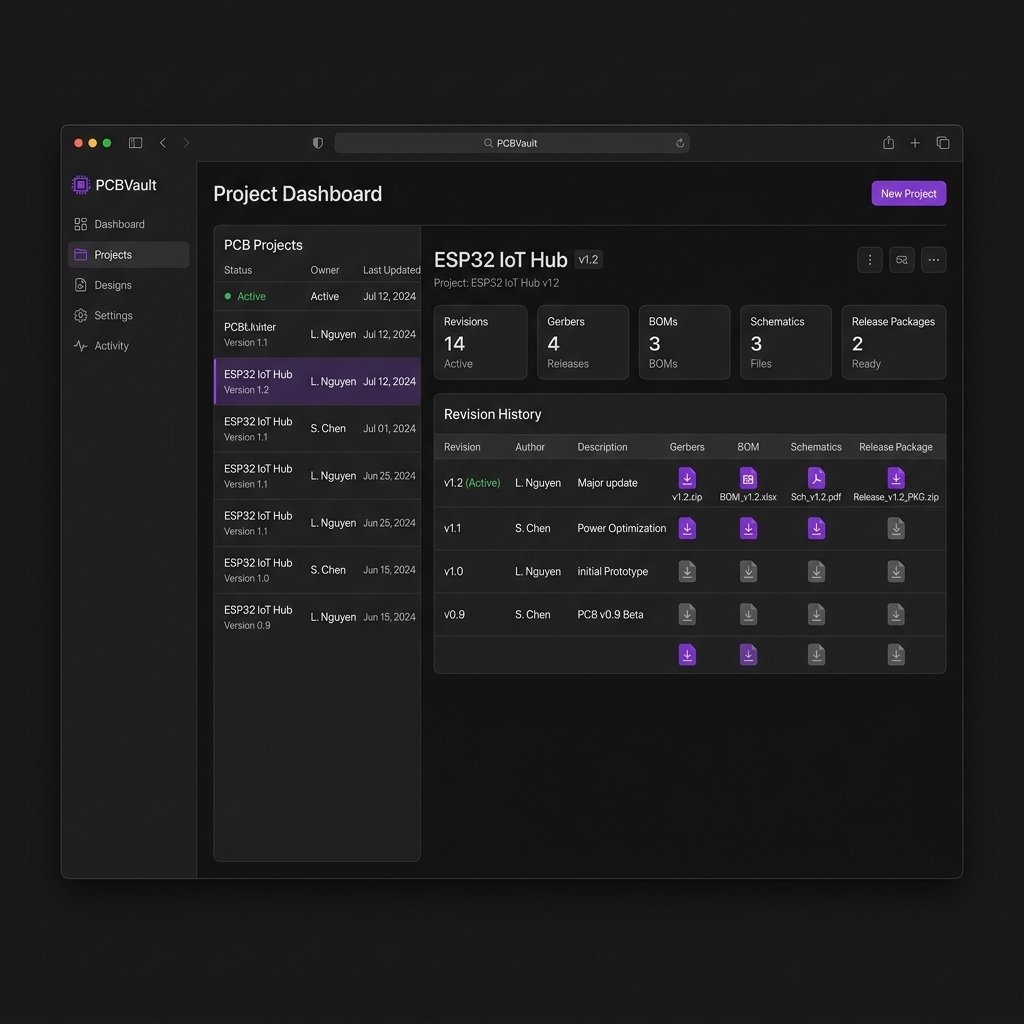
Explore the PCBVault Workspace
Click the tabs below to preview the desktop interface screens.
What you get
A practical PCB release workflow, not another generic drive folder.
Create a vault per board, client, product, or prototype line. Keep context beside the files.
Track what belongs to v1.0, v1.1, prototype batch, production batch, or customer delivery.
Check Gerbers, drills, BOM, pick-and-place, assembly notes, datasheets, and manufacturing notes.
Keep sensitive design files on your own machine instead of forcing every project into cloud storage.
Best fit
Buy PCBVault when folders are starting to cost you time.
Keep client work clean, searchable, and easier to deliver without rechecking old folder trees.
Move from prototype chaos to repeatable release packages before your team grows.
Reduce back-and-forth when design, purchase, assembly, and production need the same files.
Maintain reusable project records, reference designs, training boards, and customer deliverables.
Simple pricing
Start free. Upgrade when PCB handoff becomes serious.
Lifetime pricing keeps the decision simple for solo designers, small teams, and early hardware businesses. Local payment support is available for Indian buyers.
Up to 3 active PCB project vaults. Free forever, no credit card or account creation required. Trial the workflow on real files.
Start Free (3 Projects)Lifetime license for one user. Unlimited projects, release tracking, and local file organization. One-time payment.
Buy IndividualLifetime license for 5 seats. Built for shared revision, release, and handoff workflows. One-time payment.
Buy TeamAll plans are designed for offline-first use. Payment and license delivery are handled outside the desktop app. Indian customers can pay in INR using UPI or local cards at checkout.
Why not just Drive?
Folders store files. PCBVault stores release context.
Workflow Feature
Folders and Drive
PCBVault Desktop
Board revision
Depends on naming discipline. Easy to misplace old versions.
Project and release records keep files pinned and grouped by revision.
Manufacturing handoff
Usually a zip assembled manually with high risk of missing files.
Gerbers, BOMs, assembly notes, and drawings stay locked together.
Client delivery
Easy to send old attachments or obsolete Google Drive links.
Clearer release packages with change history and release reason notes.
Offline-first security
Requires internet. Files hosted on third-party cloud servers.
100% Local. No login or active internet needed. Files stay on your SSD.
BOM mismatch checks
None. Requires manual inspection line-by-line.
Automatic discrepancy indicators for alternates and DNP parts.
Gerber version pinning
Easy to accidentally match R1 Gerbers with an R2 BOM.
Locked relationships ensure fabrications are tied to the exact layouts.
Still deciding?
Tell us your PCB handoff problem. We will point you to the right plan.
Share how you currently manage Gerbers, BOMs, client files, and manufacturing packages. We will use it to guide the product and help you decide whether PCBVault fits.
FAQ
PCBVault Software questions
Is PCBVault Software available now?
Yes. The beta download and lifetime license plans are fully available. Use the download option to start with the free tier (up to 3 projects) or choose a plan if you are ready to use it seriously.
Why does the installer show a Windows SmartScreen warning?
Because the app is in its early access beta phase, the installer does not carry a code-signed Windows publisher certificate yet. Windows Defender SmartScreen flags unsigned new software by default. The software is 100% safe, runs entirely locally, and never transmits your files. We are currently acquiring our signed publisher certificates to ensure warning-free installations for the upcoming public release.
Can this replace Google Drive or Dropbox?
It is not generic cloud storage. PCBVault is for PCB-specific release organization: projects, revisions, Gerbers, BOMs, schematics, notes, datasheets, and manufacturing handoff context.
Will it support KiCad and Altium?
PCBVault is file-format friendly. You can organize KiCad, Altium exports, EasyEDA exports, Gerber zips, BOM spreadsheets, PDFs, drawings, datasheets, and manufacturing notes by project and release.
How is this different from Electronics PDM?
PCBVault is the simpler file and release vault. Electronics PDM is the larger workflow layer for ECO approvals, component lifecycle, audit trails, firmware-hardware links, and controlled team releases.